• 0 Shopping Cart
  • Account
    • Login
    • Forgot Password?
Custom Logo
  • Home
  • Store
    • Browse All
    • Shared Hosting
    • WordPress Hosting
    • Email Only Hosting
    • SSL Certificates
    • Site Builder
    • Website Security
    • Website Backup
    • VPN
    • SEO Tools
    • -----
    • Register a New Domain
    • Transfer Domains to Us
  • Announcements
  • Knowledgebase
  • Network Status
  • Contact Us
  • More

Knowledgebase

Secure the ideal domain name to establish your online presence.

  1. Portal Home
  2. Knowledgebase
  3. CloudLinux (cPanel)
  4. How to Enable the GD Extension of PHP Using CloudLinux Selector in cPanel
Limited Time Offers!

  Categories

Backup/Restore
4
CloudLinux (cPanel)
10
cPanel - Control Panel
24
Databases
11
DirectAdmin
48
DNS - Nameservers
6
Domain Management
10
Domains
1
Email
17
FTP
9
Getting Started Guide
4
Installing a Control Panel
6
Mail Filters & SPAM
8
Mobile
11
Others
3
PayPal
7
Plesk
47
Security
10
SiteWorx/InterWorx
58
Softaculous
69
SolusVM
18
SSL
5
Virtualizor
19
WHM
18
WordPress
1
WordPress
17

  Categories

  Support

My Support Tickets
Announcements
Knowledgebase
Downloads
Network Status
Open Ticket

How to Enable the GD Extension of PHP Using CloudLinux Selector in cPanel Print

  • 0


You can use CloudLinux Selector to enable GD extension in PHP via cPanel.


1. Log in to your cPanel account.


2. In the Software section, click on Select PHP Version.

cp-cl-select-php-version-icon.gif


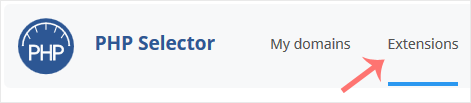
3. Click on the Extensions menu.

cl-extensions-tab-button.gif

Note: If the Extensions page shows an error related to the native PHP version, change it to a non-native version first.


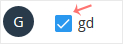
4. Checkmark the GD. Once enabled, it will display a success message.
cl-enable-gd-extension.gif


The message will read that the module GD is saved.



Was this answer helpful?

Related Articles

How to Change the PHP Version via CloudLinux Selector in cPanel   You can use CloudLinux's Select PHP Version to change your website's PHP Version. CloudLinux... How to Enable ionCube Loader Using CloudLinux Selector in cPanel   You can use CloudLinux Selector to enable ionCube Loader in cPanel.   1. Log in to your... How to Enable the Mailparse Extension of PHP Using CloudLinux Selector in cPanel   You can use CloudLinux Selector to enable the Mailparse extension in PHP via cPanel.   1.... How to Enable or Disable PHP Extensions Using the CloudLinux Selector in cPanel   You can use CloudLinux Selector to enable or disable available PHP extensions in cPanel.... How to Enable or Disable PHP's allow_url_fopen Using CloudLinux Selector in cPanel   You can use CloudLinux Selector to enable or disable the allow_url_fopen directive in cPanel....
« Back

  Support

My Support Tickets
Announcements
Knowledgebase
Downloads
Network Status
Open Ticket
iFox Host

South Africa's fastest and most affordable web hosting provider. Trusted by thousands of businesses across SA with 99.9% uptime guarantee and load shedding protection.

87 Bailey Rd, Zandspruit, Roodepoort, 2189.

Contact Support

Hosting Solutions
  • Web Hosting
  • WordPress Hosting
  • WooCommerce Hosting
  • PrestaShop Hosting
  • cPanel Hosting
  • Email Hosting
  • CMS Hosting
  • Cheap Hosting
  • Email Only Hosting
Useful Links
  • Domain Names
  • Website Builder
  • Website Design
  • Knowledge Base
  • About Us
  • Contact Us
  • Sitemap
Secure Payment
99.9% Uptime
30-Day Money Back
POPIA-Compliant Hosting
Free SSL Certificates
24/7 Support
Load Shedding Protection
Payment Methods Accepted
Visa
Mastercard
PayFast
SA Hosting Guides
How to Choose Web Hosting in South Africa
Does Server Location Affect SEO?
How to Improve Website Speed in SA
What is POPIA-Compliant Hosting?
Shared vs VPS Hosting in South Africa
How to Migrate a Website to SA Servers
Does Hosting Affect Google Ranking Locally?
How to Backup a Website Daily
POPIA vs GDPR: Key Differences for SA Websites
What is Load Shedding-Proof Hosting?
Server Location Impact on Website Speed in SA
LiteSpeed vs Apache Hosting: Which is Best?
Optimize WordPress Hosting for Speed
Why Hosting Renewal Prices Increase
Unlimited Bandwidth & Storage: The Truth
Critical Security Features for SA Websites
Protect from DDoS Attacks on a Budget
Migrate WordPress Without Downtime
Managed vs Unmanaged VPS Hosting
Load-Shedding-Proof Hosting Providers in SA
Local vs International Hosting for SEO in SA
Hosting for High-Traffic E-Commerce Stores
Shared Hosting Risks for WooCommerce
 
© 2026 iFox Host. All rights reserved. | Privacy Policy | Terms of Service

Loading...
Loading...
Choose language
العربية
Azerbaijani
Català
中文
Hrvatski
Čeština
Dansk
Nederlands
English
Estonian
Persian
Français
Deutsch
עברית
Magyar
Italiano
Macedonian
Norwegian
Português
Português
Română
Русский
Español
Svenska
Türkçe
Українська

Choose Currency

R ZAR
$ USD

Generate Password

Please enter a number between 8 and 64 for the password length